5. Calibration
Starting from v0.4.0, PyAFV provides a dedicated subpackage pyafv.calibrate for calibrating the physical parameters of the finite Voronoi (FV) model against a vertex-model-like deformable polygon (DP) model [4]. The calibration is performed by matching the steady states and detachment forces of cell doublets between the two models [3].
Important
To make it clear, the calibration tools described here are intended for advanced users who are familiar with the underlying assumptions and know exactly what they are doing.
In most use cases, the default value of the contact truncation threshold delta in pyafv.PhysicalParams is sufficient and should work well.
Note
In vertex and Voronoi models, the target shape index is defined as \(p_0 = P_0 / \sqrt{A_0}\). The DP model is expected to be valid only for \(p_0 \leqslant 2\sqrt{\pi}\), corresponding to the shape index of a perfect circle. This limitation arises because no additional constraints (e.g., curvature terms) are included in the energy to stabilize non-circular shapes in the DP model.
5.1. How to calibrate against the DP model
PyAFV provides a convenience function pyafv.calibrate.auto_calibrate(), which performs the calibration procedure automatically.
- auto_calibrate(phys, ext_forces=None, num_vertices=None, dt=0.001, nsteps=50000, show=None)[source]
Auto-calibrate the parameters phys against the deformable polygon (DP) model.
In this calibration, we simulate an initially steady-state cell doublet under increasing external force dipoles using the DP model; the external force starts from 0 to max(ext_forces). We identify the detachment force as the first external force at which detachment occurs. We then search for the
deltavalue in the finite Voronoi (FV) model to match this detachment force.- Parameters:
phys (PhysicalParams) – The initial physical parameters.
ext_forces (ndarray | None) – An array of external forces to apply during calibration; defaults to None, which uses
np.linspace(0, 10, 101)[1:]; should start from a small positive value.num_vertices (int | None) – Number of vertices \(M\) to use. If set to None (the default here), the default value from
DeformablePolygonSimulatoris used.dt (float) – Time step for each simulation step.
nsteps (int) – Number of simulation steps to run for each external force.
show (bool | None) – Whether to print progress information; no need to set it if tqdm is installed.
- Raises:
TypeError – If phys is not an instance of PhysicalParams.
- Returns:
A tuple containing the detachment force and the calibrated PhysicalParams. If detachment does not occur within the given force range, return a NaN force.
- Return type:
Warning
This function may take some time to run, depending on the parameters. (If tqdm is installed, a progress bar will be shown automatically.)
Do not change defaults unless you understand the implications. If you only need a rough or faster calibration, you may change the external force range or interval. Adjusting dt and nsteps may also speed up simulations, but may affect accuracy; test the
DeformablePolygonSimulatormodel separately to ensure accuracy is acceptable.
In brief, the calibration procedure is as follows:
Match the steady-state geometry of a cell doublet in the FV and DP models by determining the optimal cell radius \(\ell_0\); this can be done by
pyafv.PhysicalParams.get_steady_state()orpyafv.PhysicalParams.with_optimal_radius().Apply progressively increasing pulling forces to the cell doublet in the DP model until detachment occurs, and record the corresponding detachment forces; this can be done by
pyafv.calibrate.DeformablePolygonSimulator(see section below).Identify the value of
deltain the FV model that reproduces the same detachment forces observed in the DP model; this can be done bypyafv.target_delta().
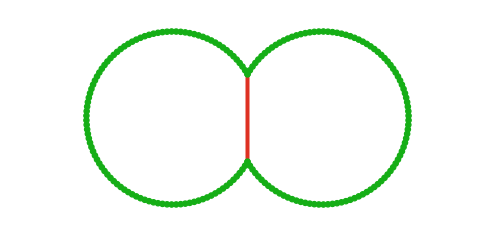
Steady state |
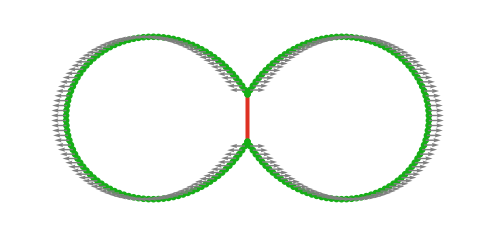
External forces applied |
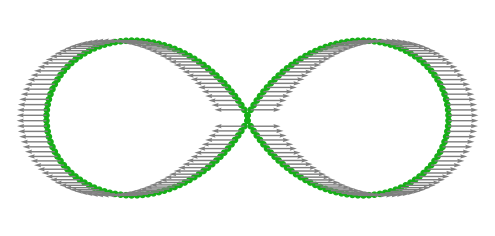
Before detachment |
A detailed description of the calibration procedure and the corresponding results on tissue fracture timescales are provided in Ref. [3].
5.2. Usage of the DP simulator
In addition to the FV simulator, PyAFV includes a pyafv.calibrate.DeformablePolygonSimulator class for simulating cell doublets with the DP model, which can be used for calibration as well as standalone analyses.
- class DeformablePolygonSimulator(phys, num_vertices=100)[source]
Simulator for the deformable polygon (DP) model of cell doublets.
- Parameters:
phys (PhysicalParams) – An instance of PhysicalParams containing the physical parameters, while phys.r and phys.delta are ignored.
num_vertices (int) – Number of vertices \(M\) to use for each cell.
- Raises:
TypeError – If phys is not an instance of PhysicalParams.
Warning
If the target shape index (based on phys.P0 and phys.A0) indicates a non-circular shape, a UserWarning is raised since the DP model is not valid in that regime.
Indicates whether the doublet has detached.
simulate(ext_force, dt, nsteps[, resample_every])Simulate the DP model for a number of time steps under an external force.
plot_2d([ax, show])Render a 2D snapshot of the cell doublet in DP model.
Below, we present a minimal example illustrating how the DP simulator is used internally by pyafv.calibrate.auto_calibrate():
import matplotlib.pyplot as plt
import pyafv as afv
import pyafv.calibrate as cal


phys = afv.PhysicalParams()

#===============  Auto calibrate ==================
f_detach, phys_cal = cal.auto_calibrate(phys, show=True)

print(f"Detachment force from DP model: {f_detach:.1f}")
print(f"{phys_cal=}")


#===========  Visualize DP simulation =============
"""
    The auto_calibrate process above is equivalent to
    applying a series of external forces until detachment
    and computing the delta value of finite Voronoi model
    that matches the detachment force of DP model.
"""

sim = cal.DeformablePolygonSimulator(phys)

# Initial shape
print(f"{sim.detached=}")
fig, ax = plt.subplots()
sim.plot_2d(ax)
plt.show()
plt.close(fig)

#------------  Apply F = 2 -------------
sim.simulate(ext_force=2.0, dt=1e-3, nsteps=50_000)
print(f"{sim.detached=}")

fig, ax = plt.subplots()
sim.plot_2d(ax)
plt.show()
plt.close(fig)

#------------  Apply F = 4 -------------
sim.simulate(ext_force=4.0, dt=1e-3, nsteps=50_000)
print(f"{sim.detached=}")

fig, ax = plt.subplots()
sim.plot_2d(ax)
plt.show()
plt.close(fig)
The generated figures are shown above.